How the API works
A program needs a key before it can shorten links. Make the key on this site, copy it, and paste it into the program. This page also has free n8n and GitHub templates. UTM, QR, MCP, and n8n are on every plan; Slack & GitHub workplace recipes are on Business. This page does not keep your key.
How to use
1. Make a key
A key is a password for a program. You make it on this website. A chat cannot make it for you.
- Sign up or sign in.
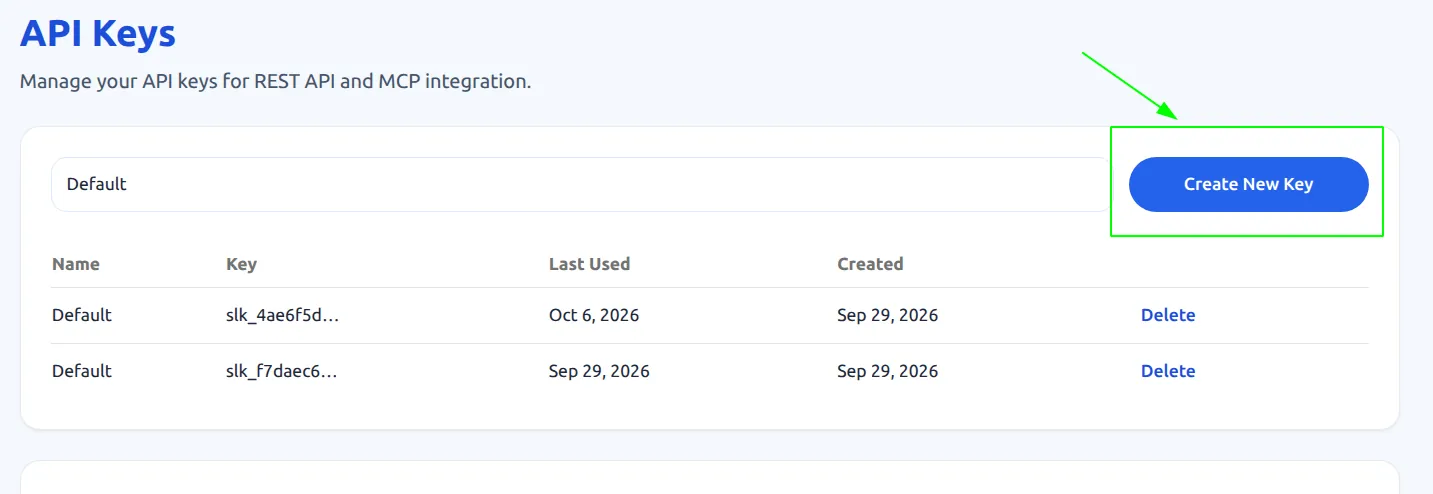
- Open API Keys. If the site asks you to sign in, sign in, then open API Keys again.
- Click Create New Key.
- Copy the key. It starts with slk_. You can see the whole key only once. If you lose it, make a new one.
2. Put the key in every request
Every request needs your key. Send it in the header x-api-key, or write Authorization: Bearer and then the key.
In the examples, YOUR_API_KEY is a blank. In your own command, replace those words with the slk_ key you copied. Do not send the words YOUR_API_KEY.
x-api-key: YOUR_API_KEY
Authorization: Bearer YOUR_API_KEY
Examples
▸Shorten one linkMakes one short link. slug is optional. It is the short name: letters, numbers, and hyphens.
curl -X POST https://linkbit.live/api/v1/links \
  -H "Content-Type: application/json" \
  -H "Authorization: Bearer YOUR_API_KEY" \
-d '{"destination": "https://example.com/long-url", "slug": "my-link", "utm_source": "newsletter"}'▸Shorten many links (up to 100 on your plan)Makes many links in one request. Bad rows come back in errors. Good rows are still created.
curl -X POST https://linkbit.live/api/v1/links/bulk \
  -H "Content-Type: application/json" \
  -H "x-api-key: YOUR_API_KEY" \
  -d '{"urls": [
    {"destination": "https://example.com/page1"},
    {"destination": "https://example.com/page2", "slug": "my-custom-slug"}
]}'▸List your linksShows every short link for this key, newest first, with the short address and click counts.
curl https://linkbit.live/api/v1/links \
  -H "x-api-key: YOUR_API_KEY"
▸Clicks for one linkUse the id from create or list. You get clicks, visitors, countries, devices, referrers, and daily totals.
curl "https://linkbit.live/api/v1/links/LINK_ID/stats?from=2026-01-01&to=2026-01-31" \
  -H "x-api-key: YOUR_API_KEY"
▸Clicks for the whole accountTop links, daily numbers, countries, devices, and referrers.
curl https://linkbit.live/api/v1/analytics \
  -H "x-api-key: YOUR_API_KEY"
n8n, Slack, and GitHub
Download a template, put your slk_ key in the x-api-key header, and run it. Same REST API as the examples above. UTM builder, QR codes, MCP, and n8n templates are on every plan. Slack & GitHub workplace recipes are listed under Business on Pricing.
- n8n — shorten one URL — Import into n8n, replace slk_YOUR_API_KEY, then Test workflow
- n8n — Slack / webhook shorten — Webhook accepts destination JSON and returns shortUrl
- GitHub Action — shorten a release URL — Copy to .github/workflows and set secret LINKBIT_API_KEY
What each field means
| Field | Where | Notes |
|---|---|---|
| destination | create / bulk | Required. A normal public address that starts with http:// or https://. Localhost and private addresses are rejected. You can also name this field url. |
| slug | create / bulk | Optional. The short name after the domain. Letters, numbers, and hyphens. Spaces become hyphens. |
| utm_source … utm_content | create / bulk / CSV | Optional. Campaign tags added to the long address. Tags already on that address stay as they are. The #part at the end stays too. |
| urls | bulk body | A list of links. You can also name this field links. |
| created / errors | bulk response | Links that worked, and a note for each one that failed. |
401 means the key is missing or wrong. 400 means the address is bad, or you made too many links today. 404 means that link id does not exist.